We specialize in digital CMYK printing so you should avoid supplying any spot colors to us for print items. In this article we will review some common misuses of spot colors in files supplied to us.
1. Supplying CMYK swatches as a Spot swatch.
This is common in files created in Adobe inDesign, and is very easy to fix. Simply double clicking on the swatch will open this options window. Simply change the Color Type from spot to Process.
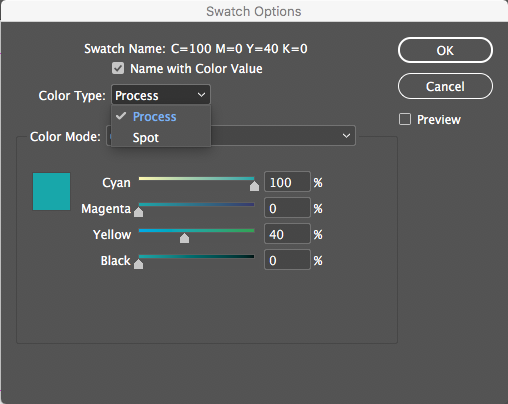
This will define the color as CMYK everywhere this swatch was used you just need to export your PDF and upload again.
2. Pantone or PMS (Pantone matching system) spot colors
If you have built your document with these colors, you can convert them to CMYK, although the color will not be a direct match. In the sample below, the left side is a selected Pantone swatch. To convert that to CMYK, you choose that option from the Color Mode drop down, then change the Color Type from Spot to Process.
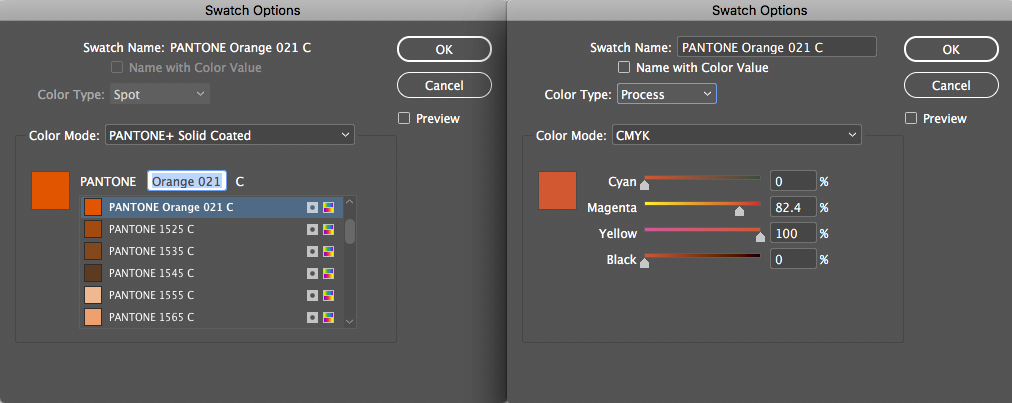
With them spread apart, it may be hard to see the difference, so here is a close up of the 2 swatches. If your monitor is calibrated you should see that the PMS swatch on the left is much more vivid than the CMYK one on the right.
You may be able to fine tune your color conversions better than what the program automatically does. For example it may work better in your layout with a little higher magenta than it defaulted to. This a prime example of why you want to handle your color conversion. If you choose to proceed as is, we will use automation to convert the colors, and the results may not be what you are expecting.
3.Registration
In a nutshell, don't use this swatch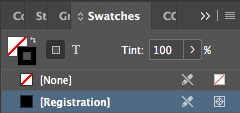
"Registration" is 100% of all inks used in a document. You may have chosen this because when you applied 100% K (black) ink, it looked gray, and you wanted it to be darker.
Applying registration means you are applying 400% ink coverage (100% of Cyan, Magenta, Yellow and Black) to the printed sheet. Typically you want to keep that number below 320%. Applying that much ink will not allow it to properly dry, and it will stick to other sheets. You can create a "Rich Black ink" swatch that uses 30C/30M/30Y/100K and get the dark black colors you are after. It does not have to match that figure (for example, if you are trying to match a dark color in your photo), but make sure you keep the total below 320%.